Dashboard Overview
The Dashboard is your home base in HipTrip. Here's what you'll find.
Main dashboard
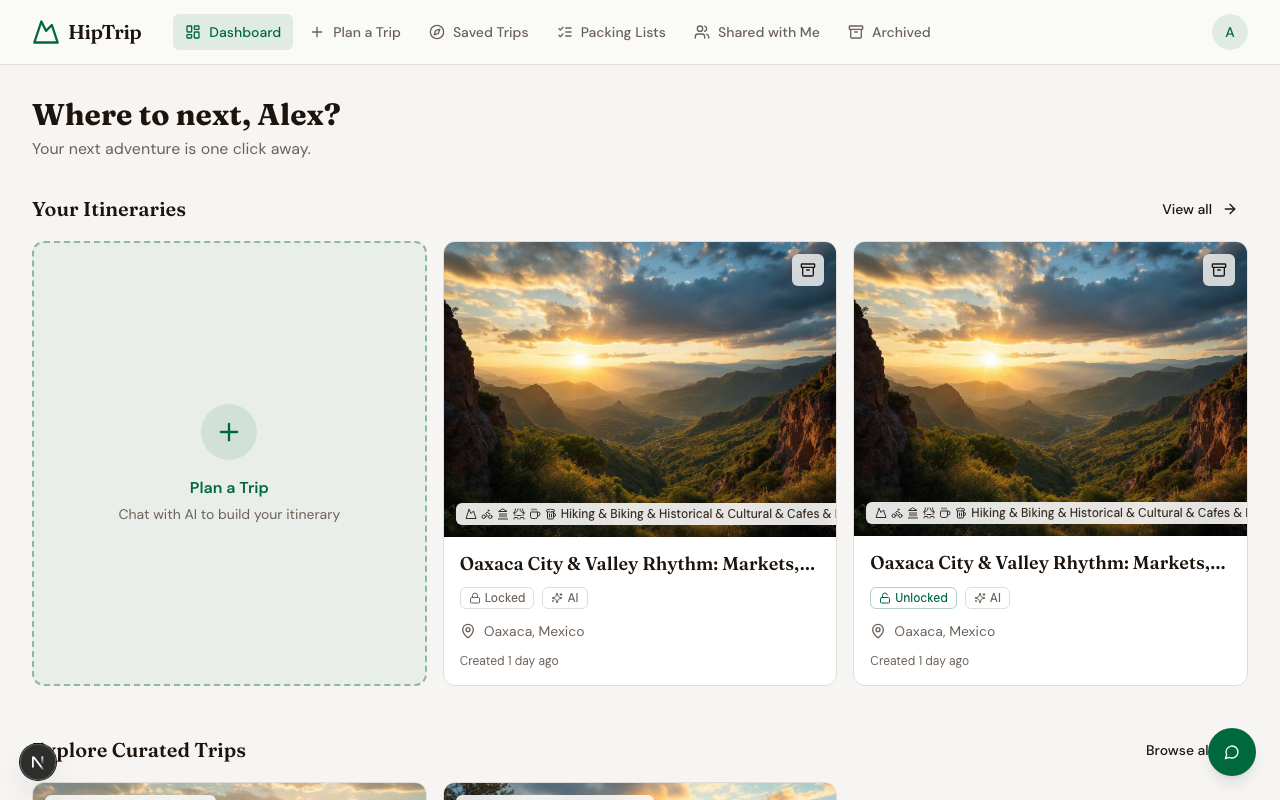
When you log in, you see:
- Greeting — A personalized welcome using your first name.
- Your Itineraries — Your two most recent trips, with a card to plan a new one. Click View all to see your full list.
- Explore Curated Trips — Three highly-rated editor-curated trip templates. Click Browse all to explore the full library.
- Promo banner — If you've applied a promo code, you'll see your available credits here.
Navigation
The sidebar (or top nav on mobile) gives you access to every section:
| Page | What it's for |
|---|---|
| Dashboard | Home — recent trips and quick actions |
| Plan a Trip | AI trip planner — describe your trip and let the AI build it |
| Saved Trips | All your itineraries and saved curated trips |
| Shared With Me | Itineraries other people have shared with you |
| Archived | Trips you've archived |
| Packing Lists | Standalone packing lists |
| Credits | Your credit balance and unlock history |
| Profile | Edit your name |
| Memory | Manage what the AI assistant remembers about you |
Itinerary cards
Each trip card shows:
- Cover image
- Trip type (hiking / biking / mixed)
- Title and destination
- Duration and difficulty level
- A star button to favorite the trip
- An archive button to move it out of your active list
Locked itineraries show a Locked badge — click through to unlock them.
Tracking shared costs
Open any itinerary and choose Expenses from its ⋯ menu to log shared trip costs, see who owes whom, and settle up. See Splitting Expenses for the full walkthrough.